


FSH SSS BA1: Introduction to VU Library and Scientific Literature

FSH SSS BA1: Introduction to VU Library and Scientific Literature

Introduction

This e-learning module is intended for first-year students at Vrije Universiteit.

Upon completion of this module, you will have an understanding of:

  • The services and resources the University Library offers to students;

  • The definition and characteristics of scholarly information;

  • How scholarly information differs from other sources, such as Wikipedia and generative AI.

The estimated time to complete this module is 30 minutes.

Sophie Steengracht – Cross-section of Earth (2023–2024) Mural, University Library, Vrije Universiteit Amsterdam

VU University Library

The library is located in the B-wing (B for Bibliotheek) of the main building at Vrije Universiteit. On the first floor, you’ll find the library’s main service desk. Here, you can activate your student card for use as a library card* — this can also be done online.

As you enter the Library Lounge, you’ll see bookshelves on the right. This is where reserved books are placed and held for you. You can borrow them using the self-service terminal.

* You can only reserve and borrow books once your student card has been activated as a library card.

There are study spaces available on every floor of the B-tower. Check pleq.vu.nl to see which spots are available.

In the study areas on the first floor, the seventh floor, and the ninth through fourteenth floors, you’ll find a small selection of the library’s physical book collection. Most books are stored in closed stacks and must be requested.

The majority of the library’s book and journal collection is available digitally.

Use LibSearch to explore the library collection, access e-books, and request books from the closed stacks. The following pages will explain how to use LibSearch effectively.

LibSearch: Finding Books and Articles

When you need a book or a scientific article, check LibSearch to see if it's available in the library.

LibSearch is a database of libraries worldwide. You can search on three levels:         

  • VU Library
  • Libraries in the Netherlands
  • Libraries worldwide

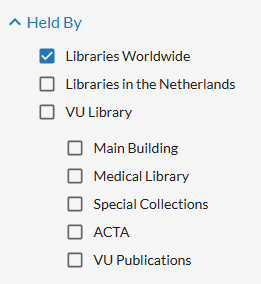
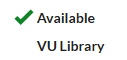
By default, the search is set to 'Libraries worldwide', and the holdings of the VU Library appear at the top. If you're having trouble finding a book or article, use the filters on the left-hand side and choose 'Best match' under 'Sort by' instead of 'Library'. If a book or article is available at the University Library (UB), this will be shown in the search results as.

Many articles and books are available digitally and can be accessed from anywhere. Some books and journals are only available as printed copies in the library. You can place a hold and borrow them for 4 weeks.

Required course literature in print can be found in the three low bookcases ('Exam Literature') in the Library Lounge on the first floor. These books can be borrowed for one day.

Use LibSearch to search for a book

When you're looking for a specific book, use the book title to search in LibSearch to check if it is available in the library and whether it is a digital or printed book. Possible search results for books in LibSearch:

  • Book is available as an eBook

If a book is available digitally, you will see the option “View eBook” and it will say “Available at VU Library”.
Click “View eBook” to open and read the book.

  • Book is available as a printed copy

If the book is physically available, you'll see “Available at VU Library” and the location where the book can be found.

  • If the book is in the stack (shown as “Stack Request”), you need to place a hold.
  • Click the title, and in the new screen, look at the right side for the access options. Click “Place hold” and follow the steps.

Note: To place a hold, your student card must be activated as a library card.

  • Book is currently on loan

If the printed book is checked out, you can still place a hold.

The person who borrowed it will be notified and can no longer renew the loan.

  • Book is not available at VU Library

If the book is not in the VU collection, you can request it through Interlibrary Loan (ILL) – note: this involves costs.
You can also check which Dutch library does have it and go there yourself.
As a VU student, you can get free membership at other university and university of applied sciences libraries in the Netherlands.

Find an article in LibSearch

  • Online Journal Articles

Most academic journal articles are available digitally. Search using the title of the article and, if needed, the author's name in LibSearch.

A journal article is available when the option ‘View full text’ is shown and it says ‘Available VU Library’.

  • Printed Journal Articles  

If a journal article is not available digitally, you can check whether a printed version is available. In that case, search by the title of the journal instead of the article title and author name. Then check whether the correct volume/year is available.

Click on ‘Access journal’ to see an overview of the volumes that are available digitally. Below, you’ll find information about which volumes are available in print at the library. When placing a request, click on the 'xx Available at x location' link and specify which volume you need.
  • Journal Article Not Available

If you can't find a journal article in LibSearch, try searching by title and author (if applicable) in Google Scholar to double-check. Articles that are not available via the VU Library can be requested through interlibrary loan.

Video: Find a publication in Libsearch

Learn how to search in LibSearch in just 3 minutes

Scientific publications

What is a scientific publication?

Scientific publications are written by and for scientists. They are intended to share research findings. This allows scientists to engage in dialogue and build on each other’s knowledge.

Publications are important for scientists. The success of a scientific career partly depends on how many publications a scientist produces, in which journals they are published, and whether the publications are cited.

How can you tell if a publication is scientific?
When you start studying, it can be difficult to determine whether an article or book is scientific. To recognize a scientific article, you should at least find the following elements:

  • the name(s) of the author(s), including information about their institutional affiliation
  • a summary (abstract) on the first page of the article
  • references to other literature within the text and a reference list (an overview of the sources cited) at the end of the article
  • a methods section explaining how the research was conducted


Types of scientific publications

There are different types of scientific literature, each suited to different purposes.
Sometimes you want to know about the latest developments in your field, or you're looking for a method you can apply in your own research. Other times, you're seeking an overview of what is already known about a topic, or you want a clearer explanation of a specific concept.

Scientific publications are usually journal articles or books. In some disciplines, articles are more important; in others, books take precedence. In the social sciences, this varies depending on the specific field.

Main types of articles:

  • Research article – A report of research conducted by the author(s). This is the most common type of article. Example.
  • Review article – An overview of the current state of research on a specific topic within a particular field. Example.
  • Meta-analysis – A type of review article in which data from multiple studies are combined. Example.
  • Case study– An analysis of a single case or situation. Example.
  • Conference paper – A shorter version of a research article, presented at a conference. Example.

Types of scientific books:

  • Monograph – usually written by a single author; provides in-depth research and thorough analysis of a specific topic.
  • Dissertation or thesis – a monograph written to obtain a PhD, in which the doctoral candidate reports on their research.
  • Textbook – intended for teaching students; provides an introduction to a specific field of study.
  • Edited volume – each chapter is written by different author(s) and contributes to an overarching theme; published under the supervision of an editor.
  • Handbook – a reference work offering an overview of scientific knowledge on a particular topic within a specific discipline.
  • Encyclopedia – a reference work containing short descriptions of concepts, theoretical approaches, or scientists; may be specific to a particular field.

What type of scientific publication is this?

It is important that you can quickly recognise the type of scientific publication that is being referred to, because different types of publications serve different purposes. It also makes it easier to find the publication.


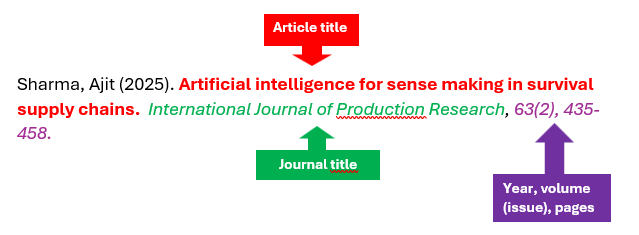
A reference to a journal article


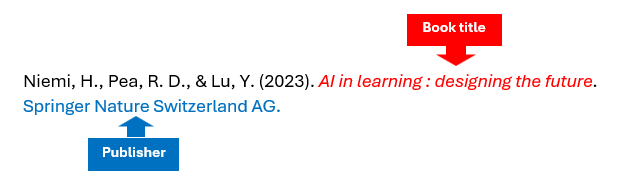
A reference to a book


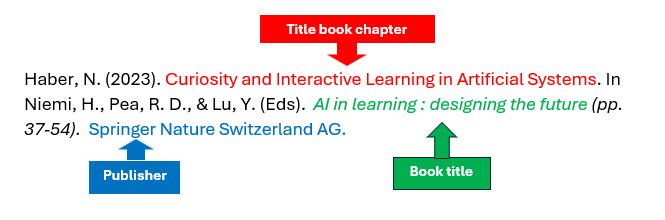
Reference to a book chapter

Structure of a Scientific Research Article

A scientific article follows a standardized structure that helps present the research in a clear and consistent manner.

Title Provides a concise and clear description of the article’s content.
Abstract A summary of the entire article. It states the purpose, methods, key results, and conclusions of the research.
Introduction              Introduces the research topic. The research question and the purpose of the article are discussed. It outlines the context of the research and highlights its added value.
Literature Review   Discussion of relevant previous studies, emphasizing the importance of the current research. The literature review may be part of the introduction.                                                                                                                     
Methods Description of how the research was conducted. For example, how participants were recruited and what data was collected. This information allows the research to be replicated.   
Results Presentation of the main findings of the research, often in the form of tables and figures.
Discussion The research findings are compared with previous studies. The contribution to the field is discussed. Suggestions for further research are also included here.
Conclusion A concise summary of the main findings of the research.
References All the literature cited in the article is listed in the reference section.


Note: This is a general guideline for the structure of a scholarly article. The actual structure may vary depending on the discipline and the journal in which the article is published.


How to read a scientific research article?

You don’t read a scientific article from A to Z.

  • First, think about the purpose for which you are reading the text.
  • Read the title closely ! You can gather a lot of information from the title.
  • Read the abstract to determine whether the article is relevant for the goal you want to achieve.
  • Then go straight to the conclusion. Here you will find a summary of the main research results and the contribution it makes to existing knowledge on a particular topic. Take notes!
  • Do you come across terms, concepts, or topics that are not entirely clear to you? Then go to the introduction section or literature review for background information on these terms and concepts.

Accountability in scientific publications

Transparency and reliability are two important requirements that a scientific publication must meet. What it contains is not necessarily true, but it must be verifiable and well-founded. The reader is expected to adopt a critical attitude.

References
A key feature of scientific texts is that they frequently refer to other sources. References make clear which work is original and which is based on the work of others.

If you use someone else’s work in your paper, you must, even as a student, indicate where the information you present comes from so that the reader can check for themselves whether what you say is correct.

There are several ways to cite sources in a text:

  • In parentheses: author + year + optional page number(s)
    Research in various European countries shows that social inequality in educational careers is persistent (Breen 2009).

  • With a superscript number referring to a footnote or endnote
    Research in various European countries shows that social inequality in educational careers is persistent¹.

  • In parentheses: a number referring to the reference list
    Research in various European countries shows that social inequality in educational careers is persistent (1).

Footnotes appear at the bottom of the page; endnotes are placed at the end of a chapter or article. Notes may contain only the author + year + page number, or the full reference.

By using the references in the text, you can look up in the reference list (also called the bibliography or works cited) all the details about the sources used. This allows you to consult the source yourself and check whether the information is correct.

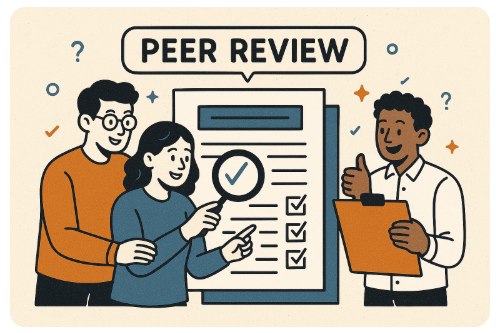
What is peer review?

One of the most important quality controls in science is peer review. This is a process in which other experts (peers) within the field assess a publication before it is published. They check:

  • Whether the research has been carried out carefully.

  • Whether the methods and conclusions are logical and well-founded. 

  • Whether the study is original and contributes to existing knowledge.

If an article does not meet scientific standards, it can be rejected or must be revised before it can be published. Peer review therefore helps to ensure the reliability and quality of scientific publications.

Picture generated by chatGPT, 2025

Non-scientific information sources

As a student, in addition to peer-reviewed scientific literature, you will encounter other types of information that are essential for conducting research, writing papers, and developing your critical thinking skills as an academic. Learning to navigate this information landscape is crucial for locating, evaluating, and effectively using reliable and relevant sources.

Key sources of information during your studies and later career include:

Source Description
Policy documents                                                          Analysis and recommendations for policy based on research into a societal issue. Often written on behalf of governments and NGOs. Shows how research can be translated into practice. Often freely available online. Much Dutch policy research is accessible via the Netherlands Research Portal of OpenAIRE.
Professional literature Written by and for professionals working in the field. The aim is to inform each other about current developments. An example of a professional journal for public administration is Harvard Business Review.
Newspapers Newspapers provide current reporting on events. Written by journalists and checked by an editorial team. Easy to read. This information should also be critically evaluated: consider authority, timeliness, objectivity, and accuracy. For finding articles, you can use the newspaper database Nexis Uni.
Social media Social media provide immediate reporting on and reactions to events. Whether social media are a useful source of information depends on the nature of your research project. Many scientists are active on social media and can be followed.
Working papers Preliminary research reports that have not yet been peer-reviewed. Often produced by universities, research institutes, or think tanks to share early findings with the academic community. Useful for accessing cutting-edge research before formal publication. Frequently available online for free.

The CRAAP Test is a method for evaluating sources for reliability and relevance.

This image of CRAAP was developed by the University of Toronto Libraries (CC BY-NC-SA 3.0 US)

Wikipedia as a source for assignments

Wikipedia: useful as a starting point, but be critical

Wikipedia is an accessible and often up-to-date source. For an initial orientation on your topic, it’s a great place: you can quickly find clear information, key concepts, and often references to more in-depth sources.

But be careful: Wikipedia is an open source. Anyone can write and edit articles. This makes the information vulnerable to errors, biased interpretations, or even deliberate misinformation.

Example: the toaster hoax

In 2012, two bored British students started a Wikipedia hoax during a dull lecture: they invented a person named Alan MacMasters and gave him a prominent role as the inventor of the electric toaster. They edited the Wikipedia article about the toaster and even created a separate page for this fictional character. It took almost ten years before someone saw through the hoax. Meanwhile, the false information was picked up by newspapers, blogs, and even museums.

Read more about this hoax at BBC News.

How to use Wikipedia responsibly

Wikipedia is usefull, as long as you remain critical. Use it as a starting point, not as a final source.

  • Check a second source to verify the quality of the information.

  • In well-written Wikipedia articles, the sources used are listed at the bottom of the page. Consult and cite these sources, but also check their reliability (CRAAP test).

  • If no sources are provided, it’s better not to use the information from Wikipedia.

Finding information with generative AI

The use of AI during your studies is not always allowed. Each program has its own rules about what is permitted and what is not. Always check the course guide for your subject before using AI for an assignment or paper.


Generative AI tools such as ChatGPT, Microsoft Copilot, or DeepSeek are convienient  tools when you need information quickly on a topic. You can communicate with them easily in natural language.

Using prompts, you can give GenAI tools tasks or ask questions to generate new content such as text (e.g., summaries or reviews), code, audio, video, and images.

Now that you are familiar with scientific information, you understand that using GenAI-generated content in your paper is not without risks:

  • You don’t know which sources were used and cannot verify whether the information is correct. When you ask ChatGPT for sources, they are often fabricated.

  • A tool is only as good as the data it was trained on, and that data can contain errors or outdated information.

  • AI tools often have limited access to scientific sources and frequently not to the most recent publications.

  • No one checks the quality of AI-generated text; that is your responsibility.

Be transparent when you use ChatGPT-generated information in your paper. Specify what you used it for and the prompt you used. Also include it in your reference list. Failing to do so can put you at risk of being accused of academic misconduct.

Be aware that a GenAI tool cannot do or know everything. GenAI tools are designed to provide a service and satisfy users, so their output often appears confident, friendly, and correct.

This video has advice on fact-checking AI-generated citations and scholarly sources. Source : https://libguides.westsoundacademy.org/artificial-intelligence-ai-and-information-literacy/fact-checking-ai-with-lateral-reading

News release about a study from UU.nl website, gedownload op August 14 2025, link

Summary

This module examines:

  • What the VU University Library can offer students.
  • What scientific information actually entails.
  • How scientific sources are distinguished from general sources such as Wikipedia or generative AI.

Searching in LibSearch

  • LibSearch is the university library's search system and provides access to scientific literature.

Scientific publications are characterised by:

  • Being written by scientists, intended for scientists.
  • Building on existing knowledge, with clear and verifiable source references.
  • Quality control through peer review.
  • Research articles have a fixed structure, so you can quickly find the information you need.
  • In the social sciences, (digital) books and articles are the most important forms of scientific publications

Non-scientific sources:

  • Policy documents, professional publications and newspaper articles can be relevant and useful sources of information
  • Use the CRAAP test (Currency, Relevance, Authority, Accuracy, Purpose) to critically assess online sources
  • Always critically assess information from Wikiwijs or obtained with generative AI tools: check facts, compare with reliable scientific sources and always state in your paper where and how you used a genAI tool
  • Het arrangement FSH SSS BA1: Introduction to VU Library and Scientific Literature is gemaakt met Wikiwijs van Kennisnet. Wikiwijs is hét onderwijsplatform waar je leermiddelen zoekt, maakt en deelt.

    Laatst gewijzigd
    2025-10-27 11:52:42
    Licentie

    Dit lesmateriaal is gepubliceerd onder de Creative Commons Naamsvermelding 4.0 Internationale licentie. Dit houdt in dat je onder de voorwaarde van naamsvermelding vrij bent om:

    • het werk te delen - te kopiëren, te verspreiden en door te geven via elk medium of bestandsformaat
    • het werk te bewerken - te remixen, te veranderen en afgeleide werken te maken
    • voor alle doeleinden, inclusief commerciële doeleinden.

    Meer informatie over de CC Naamsvermelding 4.0 Internationale licentie.

    Aanvullende informatie over dit lesmateriaal

    Van dit lesmateriaal is de volgende aanvullende informatie beschikbaar:

    Toelichting
    Kennismaking met UB en wetenschappelijke literatuur
    Leerniveau
    WO - Bachelor;
    Leerinhoud en doelen
    Sociale wetenschappen;
    Eindgebruiker
    leerling/student
    Moeilijkheidsgraad
    makkelijk
    Studiebelasting
    0 uur 30 minuten

    Bronnen

    Bron Type
    Learn how to search in LibSearch in just 3 minutes
    https://vu.cloud.panopto.eu/Panopto/Pages/Embed.aspx?id=d46a1330-eee2-444a-9e09-b150015fb55c&autoplay=false&offerviewer=true&showtitle=true&showbrand=true&captions=false&interactivity=all
    Video

    Gebruikte Wikiwijs Arrangementen

    E-learnings team informatiediensten. (2025).

    Introduction to the VU University Library and Scientific Literature (School of Business and Economics)

    https://maken.wikiwijs.nl/218681/Introduction_to_the_VU_University_Library_and_Scientific_Literature__School_of_Business_and_Economics_

  • Downloaden

    Het volledige arrangement is in de onderstaande formaten te downloaden.

    Metadata

    LTI

    Leeromgevingen die gebruik maken van LTI kunnen Wikiwijs arrangementen en toetsen afspelen en resultaten terugkoppelen. Hiervoor moet de leeromgeving wel bij Wikiwijs aangemeld zijn. Wil je gebruik maken van de LTI koppeling? Meld je aan via info@wikiwijs.nl met het verzoek om een LTI koppeling aan te gaan.

    Maak je al gebruik van LTI? Gebruik dan de onderstaande Launch URL’s.

    Arrangement

    IMSCC package

    Wil je de Launch URL’s niet los kopiëren, maar in één keer downloaden? Download dan de IMSCC package.

    Voor developers

    Wikiwijs lesmateriaal kan worden gebruikt in een externe leeromgeving. Er kunnen koppelingen worden gemaakt en het lesmateriaal kan op verschillende manieren worden geëxporteerd. Meer informatie hierover kun je vinden op onze Developers Wiki.