






Finding Scientific Literature Step by Step (FSH SSS)

Finding Scientific Literature Step by Step (FSH SSS)

Introduction

Zoeken

This module is intended for students who have just started their university studies and are searching for scholarly literature for the first time.

In this module, you will learn:

  • From topic to research question: how do you do that?

  • From research question to search query: how do you do that?

  • How can you search effectively in scientific literature databases?

  • How do you select, from the list of search results, the publications that are relevant to you?

  • How do you use literature correctly in your essay or paper?

The module takes about 60 minutes.

Would you like to take a break while working through the e-learning module and continue later? Then make sure to note where you left off, as the system will not save your progress.

If the module freezes at any point, try using a different browser.

Why do literature research?

You can think of science as an ongoing conversation.

Researchers communicate with one another through publications, where ideas are developed, knowledge is shared, and discussions take place. On many topics, there are multiple – and sometimes conflicting – perspectives.
As a researcher, it is important to be aware of these different viewpoints and to take a position yourself.

As a student, you are a beginning researcher, and the aim is that you start participating in this dialogue. This means that you need to be able to find the relevant publications in your field in order to become familiar with the various scholarly perspectives on a topic. In your assignments, you make use of this literature and reference it, showing that your contribution is grounded in the broader academic debate.

by @oksmith   CC0 1.0
by @oksmith CC0 1.0

Step 1: Scientific orientation on a topic

Finding a suitable topic

For a first orientation on your topic, you should start reading up on it. Useful sources for this are:

  • Wikipedia (be critical of its reliability)

  • Nexis Uni for news articles from newspapers and magazines

  • Introductory textbooks

  • Consulting experts

To determine whether a topic is suitable for a paper or thesis, you need to search in scholarly literature. This allows you to explore how a topic has been researched within the (social) sciences. Useful sources here are (online) reference works such as:

  • Handbooks

  • Encyclopedias

  • Scholarly dictionaries

These reference works provide an overview of different perspectives and academic debates around a topic. They give you the key concepts and generally accepted knowledge in a particular field, definitions of technical terms, references to core literature, and descriptions of connections with other disciplines.

Use LibSearch to find reference works. How to search by topic in LibSearch will be explained later in this module.


Using Mind Maps

Through mind mapping, you can get a clearer overview of a topic. Think about what you already know about a subject and what associations come to mind. When mind mapping, your thoughts can go in any direction to help generate new ideas. Organizing these ideas comes later. You can create a mind map on your own or with a group.

When you later search for literature, use your mind map as a starting point to determine your keywords.


Video UCLA Library: Mapping your research ideas

Formulating a research question

Have you formed a clear picture of your topic? Then formulate a research question. Your research question serves as your starting point. This question precisely describes what you want to know and guides the search process.

Example: You are concerned about climate change and wonder what needs to be done to address its effects.

From this interest, you can think about how to narrow down and specify the topic.

A good research question answers questions such as who, what, where, when, and why.

Question Answer
Who? Citizens, governments, companies?
What? Adaptations to climate change
Where? World, Netherlands, city/town, household?
When? In the past, present, or future?
Why? The effects of climate change pose a threat to our future

After answering these questions, you can make the research question more specific:

Due to climate change, Amsterdam is experiencing more extremely hot days in the summer and more frequent heavy rainstorms. What measures should the municipality take to protect its residents?

Once you have a (preliminary) research question, proceed to the next step: determining your search terms and formulating a search query.


Examples of poor research questions

1. Too vague

How does social media influence people?

  • It’s unclear what you mean by “influence” (emotions, behavior, opinions, health?).

  • “People” is far too broad – which group are you referring to?
    Improvement: How does daily use of Instagram affect the self-image of Dutch teenage girls aged 14–16?


2. Too broad

What are the causes of poverty?

  • Poverty is an extremely complex topic with economic, political, social, and cultural dimensions.

  • For a bachelor-level study, this is far too large to investigate with the time and resources available.
    Improvement: What is the relationship between education level and poverty among single parents in Rotterdam?


3. Too specific / closed

What percentage of students at our university has a part-time job?

  • This is purely descriptive and only provides a number.

  • There is no analysis or explanation; you are only answering a factual question.
    Improvement: Which factors explain why some students at our university have a part-time job while others do not?


4. Biased / leading

Why is online education worse than classroom education?

  • The question already assumes that online education is “worse,” which biases the research.

  • This can lead to bias in data collection and analysis.
    Improvement: What are the differences in academic outcomes between students who take online courses and those who attend classroom courses?


5. Not researchable

Does life exist after death?

  • This is a philosophical or religious question that cannot be answered empirically using scientific methods.

  • There are no measurable, observable data to provide a conclusive answer.
    Improvement: What beliefs do Dutch people hold about life after death, and which factors are associated with these beliefs?

Step 2: How to search?

Searching with keywords versus searching with natural language

It is becoming increasingly common to communicate with a database, search engine, or AI tool in everyday language. You ask a question, and the system interprets it using advanced language models. You receive a ready-made answer based on the meaning of words, their synonyms and the context of your question.

Even in scholarly literature databases, you can increasingly use natural language and search directly with your research question without first identifying keywords.

This makes searching easier, more intuitive, and more user-friendly.

However, using natural language also has risks:

  • Everyday language can be unclear or ambiguous and may be misinterpreted by a language model.

  • Lack of transparency: you don’t know exactly how the system interprets your question.

  • Questions can be insufficiently specific, leading to broad results. The system won’t necessarily point this out.

  • Many language models are trained in standard English and may struggle with other languages or jargon.

In short, searching in everyday language is very tempting, but it is important that you also learn to search using keywords and maintain control over the search process.

Determining keywords

Now that you have formulated a research question, the next step is to identify the main key concepts. These will become your keywords and serve as the starting point for creating your search strategy. Keywords are words or short phrases that represent the most important elements of your topic or research question.

In Google (and also Google Scholar), you can search using full sentences. However, it’s not recommended to search with your entire research question. This usually creates a lot of “noise”: you’ll find many publications that are not actually relevant for answering your research question.

Library databases are often not as “smart” as Google. They don’t understand full sentences, spelling mistakes, or informal language.

In the example research question below, the key concepts are highlighted in bold:

Due to climate change, Amsterdam is experiencing more extremely hot summer days and more frequent heavy rainstorms. What measures should the municipality take to protect its residents?

In this example, Amsterdam is not highlighted. That’s because it is too specific as a search term. You don’t just want to find scholarly publications about Amsterdam alone. Instead, you want to find research articles on how other cities have addressed this issue.


Synonyms and related terms

You now know the key concepts of your research question. You could use these concepts as search terms in databases like Google Scholar. But you will find more relevant literature by thinking of synonyms or other related terms for each key concept.

Use English search terms. The most important scholarly articles in the social sciences are published in international English-language journals.

Synonyms and related terms Broader terms
More specific terms

Climate change

Climate crisis

Climate


Urban floods

Urban heat stress

Extreme weather

Measures

Action

Response

Adaptation

Mitigation

Municipality

Local government

Government

Public sector

City council

Town council


Important tips for searching with keywords

  • If your search yields very few results, choose broader search terms. If you get too many results, use more specific search terms.

  • Make use of the articles you have already found to find additional search terms.

  • Searching is not a linear process: keep exploring, evaluating, and refine your research question if needed.

  • Document your search process: keep a log of what works and what doesn’t, where and how you searched, and what you found.

Creating a search query

By combining your search terms smartly, you only need to run one search query.

Example research question:

Due to climate change, Amsterdam is experiencing more extremely hot summer days and more frequent heavy rainfall. What measures should the municipality take to protect its residents?


When you start looking for scholarly literature to answer this question, the search query will look like this: 

("urban heat stress" OR “extreme weather”) AND (measure* OR action) AND (municipality OR "local government")


Search methods

Method

Syntax Example
Searching with words that belong together in that order (a phrase)

"...."


"extreme weather"
Searching with word variants, singular and plural (truncate or wildcard method)

* or ? or !

(database dependant)

organi* = organize, organization(s), organisation(s), organizational

Combine search terms to find more results


OR

Example: dogs OR  cats searches for results containing ‘dogs’, ‘cats’, or both.

Combine search terms to find less results


AND

Example : dogs AND cats searches for results that contain both ‘dogs’ and ‘cats’.

Exclude search terms


NOT

Example: dogs NOT cats searches for results that contain ‘dogs’ but not ‘cats’.

Tip: Different databases use different syntax symbols as wildcards. Check the database’s help section to see how to use them.


Step 3: Sources, where do you search ?

You have formulated a search query! The next step is choosing a database to search for literature. In a literature database, you will find an overview of publications in a specific field, on a certain topic, or by a particular author (books, book chapters, journal articles, reviews, etc.). You do not necessarily have direct access to these publications.

In the Subject Guide for Social Sciences, you will find an overview of databases and other information sources you can use. Here, we will take a closer look at the most relevant databases. We will also explore AI applications for finding literature.


Vlag

Tip: Use the “Lean Library” plugin.

If you are searching for scholarly literature, you may encounter paywalls and have to pay to access an article or book chapter. The university has agreements with publishers and aims to make as much literature accessible as possible. Make sure you are recognized as a VU student on publisher websites by installing the Lean Library plugin. As soon as you visit a website for which the University Library has a license, you will receive a notification that you can log in with your VUnetID or VUmc account.

If the installation doesn’t work, try using a different browser.


What is Google Scholar

Google Scholar is a widely used free search engine for scholarly publications. It covers all scientific disciplines.

With Google Scholar, you can find:

  • Scholarly articles (peer-reviewed and non-peer-reviewed)

  • Books and book chapters (a selection of titles from Google Books)

  • Policy research

  • Conference proceedings

  • Preprints

  • Theses and dissertations

Note: Google Scholar does not automatically provide access to the full text of publications. When working from home, make sure Google Scholar recognizes you as a VU student:

  1. Install the Lean Library plugin. This will notify you automatically when you need to log in with your VUnetID to access content.

  2. In Google Scholar, go to SettingsLibrary links, and check Vrije Universiteit Amsterdam.

Disadvantages of Google Scholar:

  • Search results are a mix of sources, including student theses. Not all sources meet the scientific standard required for academic work.

  • You get a huge number of results because it searches all text in a publication. Filtering options are limited.

What you won’t find on Google Scholar:

  • Journal articles and books that are not digitized or cited by an online article

  • Books and e-books not available in Google Books

  • Non-English publications are harder to find

Searching in Google Scholar

With Google Scholar, you can search the entire text of an article using your keywords. Word variants are searched for automatically. For example, if you use the search term “diet”, you will also find “dietary” and “diets”.

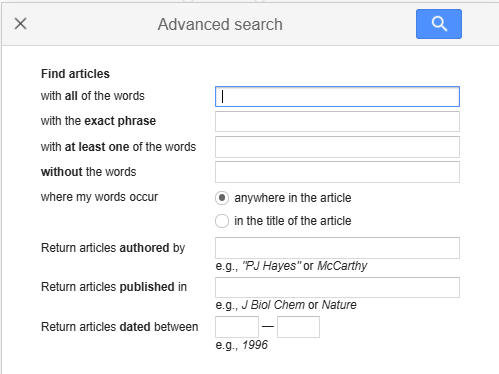
In the Google Scholar menu bar, you can select “Advanced search”.

If you would like to learn more about how to use Google Scholar, please view this minilecture (2:53) from Hanze University of Applied Sciences in Groningen.


Search results in Google Scholar

loading="lazy"

  • Two links provide access to the article: the title and the VU LibSearch link.
  • No access? Try “All 6 versions” to find a version you can access.
  • “Cited by 38” indicates the number of publications that reference this article.
  • Want to use the article in your paper? With “Cite,” you can easily copy the correct bibliographic information for your reference list. Make sure to check it for accuracy and completeness (e.g., DOI).

LibSearch

What is LibSearch?

LibSearch is the search system of the VU University Library. It allows you to search not only the holdings of the VU Library but also the collections of libraries worldwide. LibSearch is especially useful for finding (digital) books, which you can either access directly through LibSearch or reserve. Make sure your student card is activated as a library card if you want to reserve a physical book.

How to search in LibSearch is explained in the short video (2:17m) below.

Scopus

What is Scopus?

Scopus is a search engine for articles from all fields of science.   
In addition to articles, Scopus also contains books and book chapters. This is useful for disciplines where book publications are important. Book reviews are not included in Scopus.

What is the difference with Google Scholar?


  • In Scopus you will only find peer-reviewed articles. Articles must be published in journals that meet certain quality standards. Policy documents or theses are not included in Scopus.
  • By default, your search terms are applied to the title, abstract, and keywords of an article.
  • You can also choose to search specific parts of an article.
  • You will find fewer results than in Google Scholar, but what you do find is often more relevant.
  • Scopus offers many filters to refine your search and reduce the number of results.

Where can you find Scopus?

You can access Scopus through LibSearch or the Subject Guide Social Sciences. The database is available to students and staff of Vrije Universiteit. You may be asked to log in with your VUnetID.

Note! When searching in Scopus, the most recent publications are shown at the top of the results list by default. You can easily change this sorting at the top of the results page by selecting “Relevance” under “Sort by.

Access to articles

In Scopus you will find the bibliographic details of an article, such as the title, the journal name, the abstract, keywords, etc. To access the full text, click on a link below the search result: ‘Locate full-text via VU LibSearch’ or ‘View at Publisher’. Another option is to copy the title of the article and paste it into the Google Scholar search bar.

IBSS: International Bibliography of the Social Sciences

IBSS: International Bibliography of Social Sciences ​​​​​​is a database for the social science disciplines anthropology, economics, political science, and sociology, as well as related interdisciplinary fields.

What makes IBSS special is its international focus, with publications in more than 100 languages.
In IBSS you can find the following types of publications:

  • journal articles

  • books

  • book chapters

  • book reviews

Why use IBSS?

There are two important reasons to choose IBSS:

  • You search only in journals from a limited number of social science disciplines. This reduces noise and makes it easier to find relevant articles.

  • You are looking for scholarly literature in languages other than English.

How to search in IBSS:

Quick search: unstructured searching with individual keywords.

Advanced search: you can use different Boolean combinations and search in various fields such as title (of both document and publication), author, abstract, keywords, etc.

Searching: you can combine search queries, review your search history, sort the results, create alerts, build your own search commands, etc.

Thesaurus: search with your keywords in the thesaurus for exact terms and related concepts.

AI tools for finding literature

Although generative AI sometimes looks like a search engine, it is not a reliable tool for serious literature research. This is because these tools usually do not have access to recent scholarly articles, nor to major academic databases. The information you get is often outdated (mostly from before 2020), and AI can even invent sources that do not exist.

What can be useful?

  • Finding search terms or synonyms for your search strategy.

  • An initial orientation on a topic.

  • Reformulating your research question or asking for explanations of difficult concepts.

What are the risks and limitations?

  • No access to up-to-date scholarly literature.

  • No access to reliable databases such as Scopus, Web of Science, or PubMed.

  • Risk of fabricated or incorrect references.

  • Content is not verifiable or transparent (you don’t know where the information comes from).

  • Not suitable for conducting a thorough or systematic literature search.


Useful resource:

Utrecht University has an overview page on AI tools and their applications in education: UU LibGuide on AI tools

In short:

Use AI tools wisely and consciously. For serious literature research, searching in academic databases remains the most reliable method.


Step 4: Evaluating your search results

Evaluating search results

When evaluating your search results, the first thing to check is whether the publication you found will actually help you answer your research question.

  • Read the title of the article, book, or chapter carefully. You can already get a lot of information from it.
  • Scan the abstract. Abstracts can be difficult to read because of their high information density. Don’t let that discourage you.
  • Check the journal. In which journal was the article published? Is it a journal in your field?
  • Look at the publication date. An article on AI from five years ago is probably outdated. An article on Napoleon from ten years ago may still be highly relevant.
  • Consider the number of citations (*“cited by” in Google Scholar; *“citations” in Scopus). This indicates the influence of a publication, but not necessarily its quality.
  • Be cautious with theses. In Google Scholar, you will find many theses written by students. These are not scholarly publications and cannot be used as sources for your paper. Theses usually have 0 citations as well.


Vlag

Tip!

Don’t start reading right away. Keep searching, as you may find an article that better matches what you’re looking for. Once you have found around seven articles, select the most relevant publication. Avoid spending a lot of time reading an article that ultimately turns out to be irrelevant.

Remember to keep a logbook, where you note how you searched, where you searched, and how many publications you found.

Too many search results: what to do?

What can you do:

  • Is your topic/research question too broad? See if you can narrow it down. Consider the W’s: who, what, where, when, why.
  • For topics studied across multiple disciplines, add an extra search term to indicate which research discipline you are interested in. For example: “public administration” or “sociology”.
  • Limit your search to the last 5 or 10 years.
  • Adjust the sort order to relevance (if the database you are using allows it).


Too few search results: what to do?

What you can do:

  • Is your topic/research question too specific? Broaden your topic/research question.
  • Are your search terms too specific? Use broader search terms.
  • Not enough synonyms? Try to think of more synonyms for your search terms.
  • Is the syntax of your search query correct? Check that you are using quotation marks, brackets, OR, and AND correctly.
  • Too many search elements? See if you can remove a search element.


Find additional literature with references and citations

Have you found an interesting publication? Use this publication to find additional literature.


At the end of a scientific article, you will find a list of references, also known as a bibliography. This is an overview of the literature used in the article. You can search this list of references for additional literature. References are always older publications.

The number of citations for an article is listed in the search results in the database and indicated by ‘Citations’ or ‘Cited by’. This indicates how often the article has been cited in more recent publications. Click on ‘Citations’ or ‘Cited by’ to view the list of publications. This may include publications that are relevant and more recent.


Article example in Google Scholar

Example of the same article in Scopus

The same article has more citations in Google Scholar than in Scopus. This is because articles must meet certain quality requirements before they are included in the Scopus database. Google Scholar automatically searches for scientific publications on the web and also finds (non peer reviewed) preprints, research reports, and the like.

Step 5: Using literature in your paper

When writing a paper, it must always be clear which ideas are your own and which information comes from other sources. This way, you show whose work you are building on or whose work you are commenting on.

Information obtained with a generative AI tool such as Copilot or ChatGPT is also not your own, and you are required to cite the source of the information in your assignment or paper.

If you use information that is not your own without citing the source, this is plagiarism. This is considered fraud and can have serious consequences.

There are several reasons to refer to literature:

  • You give other authors the credit they deserve.
  • You show that you did not make up the information, but that you use reliable sources.
  • You show the connection between your own work and that of others.
  • You make your work verifiable: others can check the cited literature to see if you have understood and presented the information correctly.
  • You point your readers to publications on the subject that may be of interest to them.

You do not need to include a source reference for a generally known fact. For example, if you write that the Berlin Wall fell in November 1989, this is a generally known fact for which you do not need to provide a source reference.


Paraphrasing and summarizing

Paraphrasing is rewriting someone else's text or ideas in your own words. This can be beneficial for the flow of your essay or thesis. You cannot write a well-written text if you copy an existing text literally or almost literally. Moreover, you develop your own train of thought by formulating it yourself. If you paraphrase well, you also indicate that you have understood the source.

Please note: without references, this is also plagiarism. So always make it clear where the original idea comes from.

Summarizing means that you summarize a section of text (for example, a number of paragraphs, pages, a chapter, or an entire book) in your own words. When you summarize, you convey the main points or conclusions from the source that are important to your story in a few words.

Whenever you paraphrase or summarize a source, you must accurately reflect the content of the source and remain consistent with the intent of the original source. This means:

  • You may omit information that is not relevant to your story from a summary, as long as you do not distort the content of the original source.
  • Make sure it is clear where the paraphrasing or summary begins and ends.
  • For each paraphrase or summary, clearly state the source from which it originates.
An example of how to paraphrase (APA style):
Research shows that SARS-CoV-2 disseminates early in the infection period (Stein et al., 2022).


Quotation

A quotation is a piece of text that you copy verbatim from the source.

Your report should never consist of quotations strung together. As a rule of thumb, for every line you quote, you should write at least two lines analyzing the quotation.

The rules for quoting are:

  • Copy the quote carefully, using exactly the same words as the original source.
  • Copy the quote in the original language.
  • If you are quoting an English text in a Dutch report, the quotation remains in English. If you cannot assume that your readers understand the original language, first give the quotation in the original language and then a literal translation of the quotation.
  • Always quote in accordance with the intention of the source. For example, make sure that the quotation is not meant ironically and that the meaning of the quotation does not change when taken out of its original context.
  • Clearly indicate the beginning and end of the quotation by placing it between quotation marks or, in the case of longer quotations, by indenting them as a block.
  • A quotation is followed by a reference in brackets, stating the surname of the author(s), the year and the page number(s) in that order.

For more information about citing according to APA guidelines, please consult the Hanze Libguide.

An example of how a citation might appear in your paper (APA style): “We show that SARS-CoV-2 is shed early in the course of infection in some patients, with viral load in the respiratory tract being significantly higher than in other tissues” (Stein et al., 2022, p. 128).  

Output AI tools

The use of AI during your studies is not always permitted. Each faculty has its own rules about what is and is not allowed. Always check the course manual for your subject before using AI for an assignment or paper.


AI tools such as ChatGPT and Copilot are useful tools for quickly finding information on a specific topic. It is important to be critical about the information that is generated:

  • You do not know which sources have been used and cannot verify whether the information is correct. When you ask ChatGPT for sources, they are often fabricated.
  • A tool is only as good as the data it is trained on, and that data may also contain incorrect or outdated information.
  • AI tools often have limited access to scientific sources, and often do not have access to the most recent publications.
  • No one checks the quality of AI-generated text; you have to do that yourself.

You must check the information you find against other sources. You should refer to these original sources in your paper.

In addition to reliability, transparency is also an important scientific value. The results of AI cannot be found by other users of the tool. Because GenAI always gives a different output, even when you use the same prompt/input, the results cannot be reproduced by others.

There may be reasons to use AI anyway. In the section “Referencing the use of AI tools”, you will find guidelines on how to make it clear in your paper that you have used an AI tool.

Tip: Treat AI output as an external source. Check and rewrite in your own words, citing the source where necessary.


Plagiarism

Plagiarism is the act of copying someone else's words, ideas or research and passing them off as your own work. It is a serious offence in the academic world and can mean the end of your career: it is, in fact, fraud.

If you commit plagiarism during your studies, for example by not including sufficient references, this will often result in sanctions from your programme. You may be excluded from participating in the course or even be removed from your programme.

What is considered plagiarism?
Obvious examples of plagiarism are:

  • Submitting a text that is not your own as if it were your own work.
  • Copying short or long pieces of text from a source without citing the source.

However, the following are also considered plagiarism:

  • “Borrowing” someone else's words or ideas without citing the source.
  • Making a few changes to a text (or graph or figure) and pretending you came up with it yourself.
  • “Forgetting” to use quotation marks for a direct quote.
  • Providing a source reference, but giving an incomplete or incorrect reference so that the source cannot be traced.
  • Mentioning a source and the reference in your report, but not in all places where information from the source is used (in which case part of the copied information is presented as your own work).
  • Copying so many words or ideas from a source that it makes up the majority of your report is considered plagiarism – even if you do refer to the source!


Unintentional plagiarism with AI

If you use AI-generated output without indicating its origin, you may be accused of plagiarism. After all, GenAI output is based on existing texts or ideas. You may therefore unintentionally commit plagiarism if you pretend that the texts or ideas are your own. It is therefore important to indicate when you have used AI and how you have done so.

More information about how VU Amsterdam deals with plagiarism and fraud can be found here.

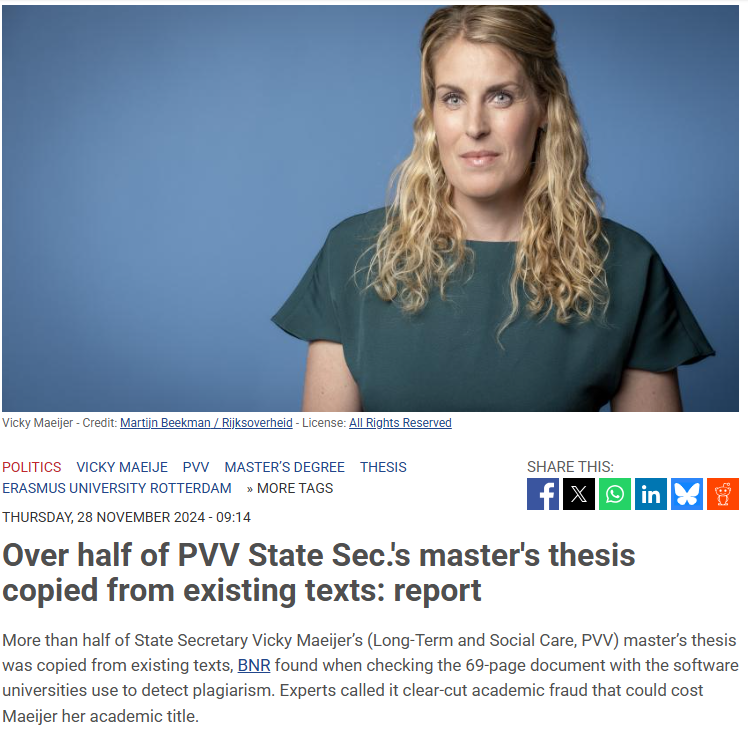
nltimes.nl, 28 November 2024

How do you refer to sources?

There are various methods, also known as reference styles or citation styles, for clearly indicating which sources you have used in an academic text. The method you use varies depending on the subject area, and sometimes even the specific course. Discuss with your lecturer which method you should use. Each style has its own rules.

Whichever method you use, there are always two important steps:

  • In the text of your report or thesis, indicate which information you have derived from which source.
  • In the reference list at the end of your paper or thesis, provide a complete reference for each source you have used. Provide all the information needed to find the source (in the version/edition you have used).

The following diagram shows how these two steps are carried out in the different methods:

  Reference methods
author - year footnotes / endnotes volgnummers (issue??)

Step 1:

Indicate in the text that you are using a source.

surname of author(s) and year of publication (and page number if cited)

Generation Z buys second-hand clothing because of the price (Mazanec & Harantova, 2024).

footnote/endnote number

Generation Z buys second-hand clothing because of the price.1


sequence (issue??) number of the publication

Generation Z buys second-hand clothing because of the price (1).


Step 2:

In the reference list, provide a complete reference.

References in alphabetical order by author name write references in the footnotes/endnotes References in the order in which they are mentioned in the text at the end of the report

The methods mentioned are a rough classification. Within each method, there are different styles that prescribe in great detail how to create references.

Which information do you need and where can you find it?

In the reference list, you provide enough information about the source so that the reader has sufficient details to locate it.

The table shows which information is needed to create references, depending on the type of publication:

Book Chapter in book Journal artice Webpage2


  • author(s)
  • title
  • year of publication
  • place of publication
  • publisher (if applicable)
  • edition (if applicable)
  • DOI1
  • author(s) of chapter
  • editor(s) of the book
  • title of the chapter
  • title of book
  • year of publication
  • place of publication
  • publisher
  • edition 
  • DOI1
  • author(s) of the article
  • title of the article
  • title of the journal
  • year of publication
  • volume
  • issue number
  • page range
  • DOI¹
  • author(s) or organization responsible for the content
  • title of the page (check the bar at the top of the browser)
  • title of the site (see the homepage of the site)
  • date of last update of the page, or copyright date
  • date you accessed the website
  • full web address (URL) of the page

1 Digital Object Identifiers (DOIs) are a series of characters that provide a permanent link to individual publications. An example of a DOI is: https://doi.org/10.1038/s43017-024-00573-7. DOIs are assigned to different types of publications, such as books, book chapters, and articles. When a DOI has been assigned, you are required to include it in the reference list.

2You cannot always find all of this information for a web page, but record as many details as possible.

Secondary sources

Sometimes you come across another interesting source in a source that you want to use for your paper. For example, a certain book may be cited in an article you are reading. In this case, the book is considered the original (primary) source, and the article in which the book is cited is the secondary source.

Avoid citing secondary sources as much as possible. In principle, only works that you have read yourself should appear in the reference list. If you are unable to access the original work—for example, if it is an out-of-print book, an old print-only report, or a work available only in a language you do not read—you may cite the secondary source.

Suppose a work by Smith is cited in Jones, and you have not read Smith. In the text, mention the primary source (Smith) and then include a reference to the secondary source (Jones). Use the phrase “cited in.

Example in APA style:

A previous study (Smith, 2009, cited in Jones, 2020) found no significant differences between the two age groups.
  • Example Vancouver style:
An earlier study by Smith, as cited in Jones (1), found no significant differences between the two age groups.


In the reference list you only list the details of the secondary source.

Disclosure of AI use

The use of AI during your studies is not always permitted. Each faculty has its own rules about what is and is not allowed. Always check the course manual for your subject before using AI for an assignment or paper.


When you use information generated by GenAI, you must reference it both in the text of your paper and in the reference list. There are several ways to show where and how you have used AI.

Mention the use of AI in the text.

  • For example: “In writing this paper, I used ChatGPT (OpenAI, 2025) to assist with structuring paragraphs and rephrasing some sentences. The final content was reviewed and revised by me.”
  • Or:“For generating sample questions and summarizing literature, I used a generative AI tool. All sources were manually verified by me.”

Include it in a footnote.

  • For example: “The first version of paragraph 3 was generated using ChatGPT. This text was then rewritten and supplemented based on my own analysis.”
  • [Footnote: OpenAI. (2025). ChatGPT (version 4). https://chat.openai.com]

Add a short AI statement at the end of your paper.

  • For example: “For this paper, ChatGPT (OpenAI, 2025) was used to assist with brainstorming structure and rephrasing certain paragraphs. The content was critically reviewed and revised by the author.”

In the reference list.

  • In the reference list, state which AI tool you used. The creator of the AI tool is considered the author, if a date is provided use the year the version you used was released, and for the title include the name of the tool.

Example reference list in APA style:

Developer. (year). Name of the AI tool (version number or date) [Large language model]. URL. OpenAI. (2025). ChatGPT (Mar 14 version) [Large language model]. https://chatgpt.com/chat

Teachers may ask you for additional information about your use of GenAI. For example: an explanation of what you did, why you used this specific tool, or a link to the conversation log.

Reference styles

As mentioned above, there are many systems for citing sources, known as ‘reference styles’ or ‘citation styles’. Each style has detailed rules for how to refer to sources such as articles, books, book chapters, websites, social media, data, newspaper articles and AI tools in the text and in the bibliography. Which style you should use depends on the programme you are following. Bookmark one of the guides below so that you always have it to hand.

APA-style(psychology but als common in Social Sciences)

Vancouver-style ((widely used in biomedical sciences)

ACS-style(widely used in the beta sciences)

Chicago-style (used in Humanities) 

Reference management tools

A reference manager is a useful software tool for citing literature and creating reference lists. Commonly used reference managers include Zotero, Mendeley, and EndNote. On the UBVU website, you can find more information about EndNote. You will also find a link with information about the EndNote workshops organized by the library, as well as details on how students can obtain a free license.

What is a reference manager used for?

  • Saving publications you have found in academic databases. You can add references manually, but you can also export them directly (often in bulk) with just a few clicks.

  • Keeping track of the literature you have found.

  • Creating citations in a text (Word) and generating a reference list in APA, Vancouver, or another output style.

Note: Always check your reference list to ensure all sources are cited correctly. Especially with non-academic sources, a reference manager does not always handle citations automatically.

Reference management software: how it works & what it does (video 4:47)

Bron: York Library, Archives and Learning Services

Summary

Purpose and structure of the module

  • Aimed at first-year students who are independently searching for academic literature in the social sciences for the first time and will be using this literature in an assignment.
  • The module takes approximately 60 minutes.
  • In five clear steps, students are guided through the process of literature research.

Step 1 – Orientation on the subject

  • Choosing a subject: how to find a suitable subject for an academic paper.
  • Mind mapping: a visual technique for mapping ideas and connections.
  • Formulating a research question: converting interest into a concrete question.
  • Examples of poor research questions: to learn where things can go wrong.

Step 2 – Formulating a search strategy

  • Keywords versus natural language: different approaches to finding literature.
  • Synonyms and related terms: finding all relevant publications with a single search query.
  • Creating a search query: techniques for targeted and effective searching.

Step 3 – Where to search?

  • Google Scholar: general and free search engine for scientific literature.
  • LibSearch: search system of the university library, recommended for finding ebooks.
  • Scopus: multidisciplinary literature database for peer-reviewed scientific articles.
  • IBSS: International Bibliography of the Social Sciences, specifically for social sciences.
  • AI tools: advantages and disadvantages of using AI tools to find literature.

Step 4 – Evaluating search results

  • Assessing search results: how to determine which search results are relevant.
  • Strategy for too many results: narrow your focus.
  • Solution for too few results: broaden your search, make your search query less specific.
  • Finding additional literature: via references and citations in the relevant articles you have found.

Step 5 – Using literature in your work

  • Paraphrasing and summarising: reproducing sources in your own words.
  • Quoting: when and how to use quotations.
  • Output from AI tools: how to deal with AI-generated texts.
  • Plagiarism: avoid accusations of plagiarism by citing your sources properly.
  • Referencing in text & bibliography: make it clear in your paper where you have used which source.
  • Secondary sources: how to refer to a secondary source in your paper.
  • Disclosure of AI use: always be transparent when using AI.
  • Reference styles and reference managers: each citation style has its own rules for how to refer to the literature you have used in your paper in the text and bibliography.
  • The arrangement Finding Scientific Literature Step by Step (FSH SSS) is made with Wikiwijs of Kennisnet. Wikiwijs is an educational platform where you can find, create and share learning materials.

    Last modified
    2025-09-04 11:50:39
    License

    This learning material is published under the Creative Commons Attribution 4.0 International license. This means that, as long as you give attribution, you are free to:

    • Share - copy and redistribute the material in any medium or format
    • Adapt - remix, transform, and build upon the material
    • for any purpose, including commercial purposes.

    More information about the CC Naamsvermelding 4.0 Internationale licentie.

    Additional information about this learning material

    The following additional information is available about this learning material:

    Description
    How to do literature research.
    Education level
    WO - Bachelor;
    Learning content and objectives
    Sociale wetenschappen;
    End user
    leerling/student
    Difficulty
    makkelijk
    Learning time
    1 hour 0 minutes

    Sources

    Source Type
    Video UCLA Library: Mapping your research ideas
    https://youtu.be/jj-F6YVtsxI?si=sUAOpaJk91JrQNj8
    Video
    Bron: York Library, Archives and Learning Services
    https://youtu.be/nYDAuT8sSco?si=JN7avqx4gRBR-UM7
    Video

    Used Wikiwijs arrangements

    E-learnings team informatiediensten. (2025).

    Vinden van wetenschappelijke literatuur - stap voor stap (FSH SSW)

    https://maken.wikiwijs.nl/213208/Vinden_van_wetenschappelijke_literatuur___stap_voor_stap__FSH_SSW_

  • Download

    You can download the entire arrangement in the formats listed below.

    Metadata

    LTI

    Learning environments that use LTI can play Wikiwijs arrangements and tests and report results. To do this, the learning environment must be registered with Wikiwijs. Do you want to use the LTI connection? Send an email to info@wikiwijs.nl with the request to set up an LTI connection.

    Are you already registered with us? You can use the Launch URLs below.

    Arrangement

    IMSCC package

    If you don’t want to copy the Launch URLs separately, but want to download them all at once, download the IMSCC package.

    For developers

    Wikiwijs learning materials can be used in an external learning environment. Technical connections can be made and the learning material can be exported in various ways. More information about this can be found on our Developers Wiki.